Disclaimer: 9to5gadgets.com is a participant of the Amazon Services LLC Associates Program. Any valid purchases made through clicking on the links on this site (when directed to Amazon) will garner us a commission.

Lenovo Ideapad 3 81X800ENUS RAM Upgrade Tutorial

We've already talked in-depth about the Lenovo Ideapad 3 81X800ENUS. We've mentioned that it's not really the best laptop the market has to offer and you could do better with numerous other options such as the ACEMAGIC AX15 with its 12th generation N95 processor, 16 GB of RAM, and 512 GB of storage. 

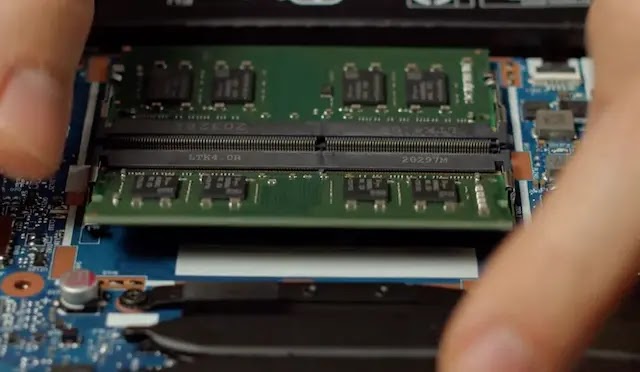
However, the fact that it's not the best laptop Lenovo has to offer doesn't mean there aren't a few tweaks we could do to improve the overall performance. On that note, today we're going to walk you through the process of upgrading the RAM on the Lenovo Ideapad 3 81X800ENUS.

With a powerful processor, 256 GB of SSD storage, and a crisp 15-inch display, a RAM upgrade would definitely mark an improvement for this notebook in everyday performance. Without further ado, let's get on with this upgrade tutorial.

HP 15-eu1026nr RAM Upgrade Tutorial Step-By-Step


When we think about convertibles typically you're used to them being non-upgradable. You get what you bought and that's it. However, there are a few exceptions to this rule as we can see with the HP 15-eu1026nr.

This competitively-priced convertible features a stunning 15.6-inch Full HD touchscreen display, a AMD Ryzen 7 5825U processor, AMD Radeon graphics, 512 GB of SSD storage and a fairly limited amount of RAM of just 8 GB soldered onto the board.

Today, we're going to walk you through the process of upgrading the RAM on the HP 15-eu1026nr. You can't remove the onboard RAM that's soldered onto the board but you can insert another module within its available slot and that's what we're going to be covering today. 

Chicbuy CB1508: Shut Up And Take My Money!

Diving into the world of starter laptops? It's kinda like hunting for that one cool trinket in your attic. Sure, big names like Dell, HP, Lenovo, and Apple usually grab the spotlight. But hey, ever heard of Chicbuy? If not, don't sweat it – you're not alone.

Recent years have thrown some love to international brands like Chicbuy. And there’s a buzz around their Chicbuy CB1508 model. Why? Well, for starters, it's got a pretty sweet price tag and people can't stop raving about it.

Picture this: a 15.6-inch FHD screen, the nifty Intel Celeron N5095 quad-core chip, a whopping 12GB DDR4 RAM, and a zippy 512GB SSD. Sounds like Chicbuy's not just in the game – they're playing to win. 

But here’s the real question: does this laptop actually live up to its specs in everyday use? Grab your coffee, let’s dig in and see if this underdog's worth your cash. It's also worth mentioning that you're not seeing double, the specs are pretty much the exact same as the Chicbuy CB1507 model we talked about earlier, with the only noticeable difference being that the CB1507 features a 120 Hz display refresh rate. 

Specs Details
Name Chicbuy CB1508
Processor Intel Celeron N5095 (Base Clock: 2.00 GHz, Turbo: 2.90 GHz)
Graphics Card Intel HD Graphics 520
Display 15.6” Full HD (1920x1080)
Memory 12GB DDR4 RAM
Storage 512GB SSD
Connectivity 2x USB 3.0 Ports, USB Type-C, HDMI Port, TF Card Reader, 2.4/5G WiFi
Webcam Standard entry-level notebook camera
Battery 6 to 8 hours (depending on usage)


Who's the Chicbuy CB1508 for?

Well, think of it as that perfect, comfy pair of sneakers - they’re not Gucci, but they're super reliable for the daily grind. If you're the type to juggle between Netflix and an Excel spreadsheet, this laptop's got your back. It’s powered by the Intel Celeron N5095 and a sizable 12GB DDR4 RAM. Meaning, it’s perfectly crafted for surfing the web, jamming to Spotify, and getting that PowerPoint presentation done—all at the same time.

ACEMAGIC AX15: Re-writing The Rules on Entry Level Laptops

In the realm of laptops, the balancing act between power and price has always been a delicate dance. Consumers, especially those entering the world of laptops for the first time or those looking for an upgrade without burning a hole in their pocket, face a daunting task. With myriad options spanning a range of prices, features, and brands, the hunt for the "right" entry-level laptop can feel overwhelming.

On that front mainstream brands often capture the attention due to their pronounced advertising and well-established reputations. However, ACEMAGIC is a testament to this shift in dynamics. 

Though it might not be a household name in all parts of the world, its trajectory in recent years has garnered attention. Their latest offering, the ACEMAGIC AX15, is generating quite a bit of buzz, and for good reasons. The compelling laptop along with its compelling price delivers a powerful Intel N95 processor, 16 GB of RAM, and 512 GB of storage as its biggest selling points.

This technical review aims to dissect the AX15, peeling back its layers to understand what it brings to the table and whether it holds its own amidst a sea of competitors.

Specs Details
Name ACEMAGIC AX15
Processor Intel 12th generation Alder Lake N95 (4 cores, 4 threads, Base: 1.7GHz, Turbo: 3.4GHz)
Memory 16GB DDR4 RAM (Upgradable to 32GB)
Storage 512GB M.2 SSD + 128GB TF card expansion support
Design & Build Metal construction, 3.75lbs weight, 0.66 inches thickness, 180° lay-flat hinge
Display 15.6-inch thin-bezel IPS Brightview, Full HD (1920x1080 pixels)
Keyboard Solid travel distance, no backlight
Connectivity 2x USB 3.2 Type-A, 1x USB 2.0 Type-A, 1x USB Type-C, HDMI, TF card reader (up to 128GB), Dual-band 2.4/5GHz WiFi, Bluetooth 5.0
Webcam HD (720p resolution)
Battery Life 5 to 7 hours, fast charging (full charge in 2.5 hours)
Special Features Upgradable RAM, intelligent cooling fan system, 180° hinge, EyeCare technology


Who's this laptop for?


The ACEMAGIC AX15 is tailor-made for both newcomers to the laptop arena and seasoned users seeking an upgrade that blends performance with affordability. Its robust Intel N95 processor and expansive 16GB RAM make it a prime choice for multitasking enthusiasts, from students handling myriad tasks to professionals who demand smooth, lag-free operations

Additionally, its sleek design and portability cater to on-the-go individuals, making it a formidable companion for those who value efficiency wrapped in a stylish package.

SGIN X15S: A New Entry-Level King Breaks The Market

In today's world of never-ending tech innovations, spotting a laptop that offers a harmonious blend of power and affordability is like finding a diamond in the rough. Amidst a whirlwind of options, the SGIN X15S emerges, turning heads with its attractive price tag and impressive specifications.

Packed with an Intel Celeron N5095 Quad-Core Processor, a massive 24 GB of RAM, and an impressive 1 TB SSD storage unit, coupled with a dazzling Full HD display, and a suite of features promising seamless connectivity, this laptop promises a powerhouse user experience without featuring a "powerhouse price tag". Let's plunge into the SGIN X15S's realm and help you discern if it's your next tech companion.


Specs Details
Name SGIN X15S
Display 15.6-inch Full HD
Processor Intel Celeron N5095 Quad-Core Processor (Base Frequency: 2.0GHz, Turbo Boost: 2.9GHz)
Graphics Intel UHD Graphics
Memory 24GB DDR4 RAM
Storage 1TB SSD with option to add a 512GB TF card
Weight 3.72 pounds
Connectivity Options 1 USB Type-C, 2 USB Type-A, HDMI, WiFi 2.4/5 GHz, Bluetooth 4.2


Who's the Ideal User for the SGIN X15S?

SGIN's X15S isn't just another laptop; it's a versatile beast tailored for a diverse user base. Picture this: students juggling online classes, professionals managing endless Zoom calls, movie buffs craving sharp visuals, or light gamers wanting interruption-free sessions. The SGIN X15S rises to these diverse occasions with aplomb.

Chicbuy CB1507: Shaking Things Up For The Entry-Level PC

Navigating the expansive realm of entry-level laptops can feel like searching for a needle in a haystack. In an industry dominated by household names, consumers often get caught in the brand frenzy, overlooking some hidden gems. 

While major players like Dell, HP, Lenovo, and Apple tend to dominate the conversation, the past few years have seen a surge in popularity for foreign brands, such as Chicbuy. Among these emerging challengers, Chicbuy's CB1507 stands out as a compelling contender thanks to its competitive price point and outstanding reviews

With its 15.6-inch FHD display, the potent Intel Celeron N5095 quad-core processor, a generous 12GB DDR4 RAM, and a swift 512GB SSD, the CB1507 isn't just ticking boxes but highlighting them. But do these specs translate to real-world efficacy? Let's delve deeper and uncover the truth behind the numbers as we do a deep analysis of this laptop to help you figure out if it's worth your time (and money).

Specs Details
Name Chicbuy CB1507
Processor Intel Celeron N5095 (Total Cores: 4, Total Threads: 4, Burst Frequency: 2.90 GHz, Cache: 4 MB)
Graphics Card Intel HD Graphics 520
Display 15.6” Full HD (1920x1080)
Memory 12GB DDR4 RAM
Storage 512GB SSD
Connectivity 2x USB 3.0 Ports, USB Type-C, 2.4/5G WiFi, Bluetooth 4.2
Webcam Not Specified
Battery 38WH, up to 8 hours battery life
Weight 3.26 pounds


Who's this laptop for?


The Chicbuy CB1507 is a compelling choice for everyday users who seek a balance between performance and affordability. With its Intel Celeron N5095 processor and 12GB DDR4 RAM, it's more than capable of handling daily tasks like browsing, media consumption, office work, and even light multitasking

Its 512GB SSD ensures faster boot times and quick access to stored files, making it an ideal pick for students, office goers, and home users who appreciate smooth performance without breaking the bank.

Dell Inspiron 16 5635 (‎i5635-A005SLV-PUS) Storage Upgrade Tutorial

We've talked in great detail about the Dell Inspiron 16 5635  (‎i5635-A005SLV-PUS), an impressive 16-inch laptop with a killer display, powerful AMD Ryzen 7 7730U processor, 1 TB of storage, and 16 GB of RAM. It's a great laptop and one that we recommend every day for students and professionals who want to get a solid laptop with a good price-to-value proposition

However, everything can always be improved, and while we're fairly happy with the 1 TB storage, you might need a bit more storage capacity than us. It's with that in mind that today we'll walk you through the process of upgrading the storage on the Dell Inspiron 16 5635 (‎i5635-A005SLV-PUS)

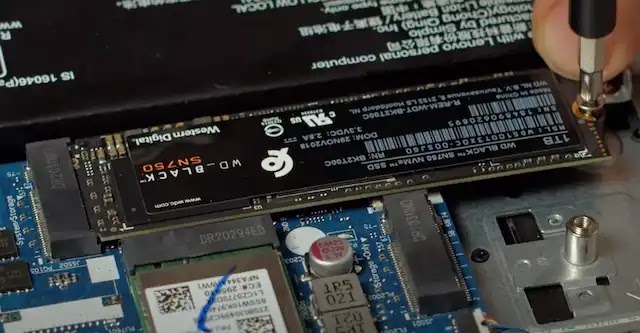
Specifically, we're going to be introducing a 2280 NVMe PCIe storage module. It's not a complicated upgrade, you should be in and out in about 10 minutes tops. So roll up your sleeves, get your screwdriver, and let's do this!

Lenovo IdeaPad Gaming 3 82SB0001US Storage Upgrade Tutorial

When it comes to gaming laptops there are several factors that contribute to them being a success. We generally focus on the processor, graphics card, and RAM. However, one aspect that's often overlooked is the storage. Having enough storage will not only help for a snappier performance if you've saturated your current drive with data but it will also allow you to store more games as well as your media library.

Yesterday we walked you through a step-by-step guide on how to upgrade the RAM on the Lenovo IdeaPad Gaming 3 82SB0001US. Today we're going to go in a different direction and we're going to help you upgrade the storage. Specifically, we're going to swap out the 2242 NVMe PCIe SSD for a bigger 2280 NVMe PCIe SSD. 

Lenovo IdeaPad Gaming 3 82SB0001US RAM Upgrade Tutorial

The Lenovo IdeaPad Gaming 3 82SB0001US is a great budget-friendly gaming laptop available at a really competitive price point. It features some interesting specs such as a 15.6-inch Full HD display with a 120 Hz refresh rate, a powerful AMD Ryzen 5 6600H processor, and a fairly respectable NVIDIA GeForce RTX 3050 graphics card. However, it does lack in some important aspects; RAM and Storage. Specifically, it boasts a meager 8 GB of RAM and just 256 GB worth of NVMe SSD storage (in the 2242 form factor).

Fortunately for us, it's easily upgradable and today we're going to specifically tackle how to go about upgrading the RAM on the Lenovo IdeaPad Gaming 3 82SB0001US. Out of all the RAM upgrades we've performed here over the course of the years, this is easily one of the easiest and we thank Lenovo for providing such a simple design for users to easily upgrade the RAM. 

How To Fix (Easily) The CLS Core Web Vital on Blogspot/Blogger Blogs

So you're passing your site through Google's PageSpeed Insights and you notice a big red "Failed" on your Core Web Vitals segment for mobile performance. You start going into a panic, you remember that time you flunked your biology test and it all comes rushing back. Well, one of the main culprits in the case of the Core Web Vital's failure will likely be your score in regards to the CLS, or Cumulative Layout Shift.

Today, we're going to dive in to explain to you how you can fix this metric with a Blogspot/Blogger blog to improve upon your core web vitals so that you can also improve your rankings. It's important to note that this is not the only metric considered within the Core Web Vitals but, as its name suggests, it's one of the "Vital" ones according to Google.

So, what is the CLS anyhow?

Cumulative Layout Shift (CLS) is a web performance metric that measures the visual stability of a page. Specifically, it quantifies how much unexpected layout shift occurs as a page loads and while the user interacts with it. Unexpected layout shifts can be jarring for users, making it difficult for them to interact with a page, so a lower CLS score indicates a more stable page from a user's perspective.

Here's how CLS works:

Layout Shift Score: Every time an element on the page changes its visual position, a layout shift score is calculated for that individual shift. The score is a product of two factors:

Impact Fraction: The percentage of the viewport that was displaced during the shift.

Distance Fraction: The distance the unstable element has moved, relative to the viewport's largest dimension (usually the height on mobile devices and width on desktop).

Cumulative Score: Over the lifecycle of the page, each individual layout shift score is added together to get the "cumulative" layout shift score. This total is the CLS.

Acer Aspire 5 A515-45-R1YC: A Great Value Proposition

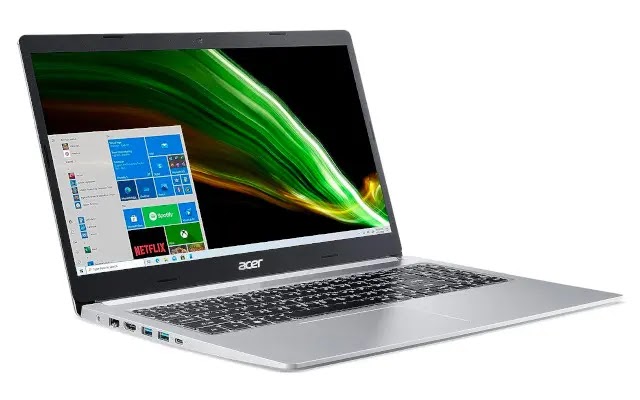
In today's rapidly evolving technological landscape, finding a mid-range laptop that strikes the right balance between performance and price can be a daunting task - to put it mildly -. Amidst a sea of choices, the Acer Aspire 5 A515-45-R1YC emerges as a notable contender, due to its highly compelling price point and rave reviews

With its AMD Ryzen 5 5500U Hexa-Core processor, Full HD IPS display, and a range of features that promise seamless connectivity and functionality, this model seems poised to deliver a robust computing experience. Let's dive deeper into what this laptop brings to the table, as we help you figure out if this is the right choice for you. 

Specs Details
Name Acer Aspire 5 A515-45-R1YC
Processor AMD Ryzen 5 5500U Hexa-Core (Base Frequency: 2.1GHz, Max Turbo Frequency: 4.0GHz)
Graphics Card Integrated AMD Radeon Graphics
Display 15.6" Full HD IPS (1920x1080 pixels) with narrow-bezel design
Memory 8GB DDR4 RAM
Storage 256GB NVMe SSD
Connectivity Wi-Fi 6, USB Type-C, USB 3.2, HDMI 2.0, Ethernet Port, Power-off charging USB port
Webcam HD Webcam with Acer's Purified Voice
Battery Roughly around 7-9 hours depending on usage
Special Features Acer TrueHarmony, Acer Purified Voice


Who's this laptop for?

The Acer Aspire 5 A515-45-R1YC isn't just a laptop; it's a dynamic companion tailored for a wide range of users. From students and office professionals who need a reliable tool for daily tasks and video calls, to casual gamers and media enthusiasts hungry for crisp visuals and smooth performance, this laptop shines. Its versatility makes it a hit with tech experts managing multiple devices, young adults diving into the gaming world, or even retirees searching for a dependable and intuitive digital partner.

Jumper Ezbook S5 MAX VS. ANMESC LT1506: Which Is Best?

Jumper Ezbook S5 MAX VS ANMESC LT1506

So, here we are, diving deep into the vast ocean of laptop choices, and it looks like you've managed to filter out two gems from the treasure trove: the Jumper Ezbook S5 MAX and the ANMESC LT1506. On the surface, they might seem like twins separated at birth. 

But as we look closer, there are some nuances that differentiate these siblings. That's why today we set out to straighten things out in this comparison of the Jumper Ezbook S5 MAX vs the ANMESC LT1506. Let's get on with it!

Specs Jumper EZbook S5 MAX ANMESC LT1506
Name Jumper EZbook S5 MAX ANMESC LT1506
Processor Quad-Core Intel Celeron N5095 (Turbo Frequency up to 2.9GHz) Quad-Core Intel Celeron N5095 (Turbo Frequency up to 2.9GHz)
Graphics Card Intel UHD Graphics Intel HD Graphics 520
Display 16-inch FHD (1920x1200) with 93% screen-to-body ratio and 16:10 aspect ratio 15.6-inch FHD (1920x1080)
Memory 16GB DDR4 RAM 12GB DDR4 RAM
Storage 512GB SSD 512GB SSD
Connectivity Dual-band Wi-Fi (2.4G/5G), USB Type-C, Micro HDMI, USB 3.0 Type-A, Micro TF slot, Bluetooth 4.0, Audio-jack Dual-band Wi-Fi, USB Type-C, USB 3.0 Type-A, HDMI, Bluetooth, Audio-jack, micro TF slot
Webcam Standard budget-laptop webcam Standard webcam with physical shutter for privacy
Battery 38000 mWH (6 to 8 hours depending on usage) 38000 mWH (roughly 4-5 hours)
Weight and Dimensions 3.63 pounds, 14.4 x 9.56 x 0.7 inches 4.03 pounds, 15.6 x 0.5 x 9 inches
Special Features Quad stereo speakers, Cooling system with internal fan, TF card expansion slot (up to 256GB) Physical shutter for webcam, Stereo speakers, TF card expansion slot (up to 512 GB)
Price:

Diving straight into the heart—the processor—it's a tie. Both machines come with the Intel Celeron N5095 quad-core processor. This means that when it comes to raw computing power, you'd be hard-pressed to notice any difference between the two. They've got the same muscle, pumping up to a Turbo Frequency of 2.9 GHz.

ANMESC LT1506 (‎AN-X16): Re-Imagining The "Budget Laptop" [Analysis]


Here's the thing: diving into the realm of laptops can feel a bit like wandering in a jungle. With each branch you brush aside, there's another shiny gadget vying for your attention. Now, most of us are well-acquainted with the dominant creatures of this tech wilderness—the big-name brands we've come to trust over the years. Yet, as any seasoned explorer will tell you, there are always surprises lurking in the underbrush. 

Enter ANMESC, a brand that's been quietly making waves with laptops like their ANMESC LT1506 (‎AN-X16). At a glance, this gem - with stunning reviews - boasts a vibrant 15.6-inch FHD display, is powered by a quad-core Intel Celeron N5095 processor, and impressively packs a combo of 12GB DDR4 RAM with a 512GB SSD. And did I mention it runs on the freshly-minted Windows 11? 

But those are just the headlines. Buckle up, tech enthusiasts; we're about to embark on a detailed journey to discover whether the extremely affordable ANMESC LT1506 is the hidden treasure we've all been seeking in this in-depth technical review - BTW, if you're looking for the grey version that's the ANMESC LT1508 we covered here -

Specs Details
Name ANMESC LT1506
Processor Intel Celeron N5095 Quad-core (Base frequency: 2.00 GHz, Max Turbo: 2.9 GHz)
Graphics Card Intel HD Graphics 520
Display 15.6” Full HD (1920x1080)
Memory 12GB DDR4 RAM
Storage 512GB SSD
Design Sleek silver finish, Weight: 4 pounds, Thickness: 0.5 inches
Keyboard Standard. No backlight. Includes numeric keypad
Connectivity USB 3.0 ports, USB Type-C, HDMI output, TF card reader, Audio jack
Webcam Standard webcam with physical shutter
Battery Between four and six hours depending on usage


Who's This Laptop For?

The AN-X16 is an ideal pick for students and on-the-go professionals. Its lightweight design combined with 12GB RAM makes multitasking a breeze, and the 512GB SSD ensures quick access to important files. 

Jumper Ezbook S5 MAX: Redefining The Entry-Level Laptop

In an ever-evolving digital landscape, the quest to find a reliable yet budget-friendly laptop often feels like searching for a needle in a haystack. While the market is brimming with options, discerning the genuinely good ones from the average becomes a challenge. 

For years, the conversation has been dominated by renowned brands that have become household names. Yet, as the tech world expands, it's the underdogs, the lesser-known brands like Jumper, that are breaking barriers and delivering impressive results.

The Jumper Ezbook S5 MAX, with its 16-inch FHD display, 16GB RAM, a quad-core Intel Celeron N5095 processor, 512GB SSD storage, and the latest Windows 11 operating system, seems like an attempt to redefine what entry-level laptops can achieve

These specs, often found in pricier models - never at this price point -, make this laptop an intriguing proposition. With such promise on paper, it's only right to delve deeper and see if the laptop lives up to its impressive specifications. That's why we're here today, to find out if the Jumper Ezbook S5 MAX is everything it's cracked up to be in this detailed technical review. 

Specs Details
Name Jumper EZbook S5 MAX
Processor Quad-Core Intel Celeron N5095 (Turbo Frequency up to 2.9GHz)
Graphics Card Intel UHD Graphics
Display 16-inch FHD (1920x1200) with 93% screen-to-body ratio and 16:10 aspect ratio
Memory 16GB DDR4 RAM
Storage 512GB SSD
Connectivity Dual-band Wi-Fi (2.4G/5G), USB Type-C, Micro HDMI, USB 3.0 Type-A, Micro TF slot, Bluetooth 4.0, Audio-jack
Webcam Standard budget-laptop webcam
Battery 38000 mWH (6 to 8 hours depending on usage)
Weight and Dimensions 3.63 pounds, 14.4 x 9.56 x 0.7 inches
Special Features Quad stereo speakers, Cooling system with internal fan, TF card expansion slot (up to 256GB)


Who's this laptop for?

The Jumper EZbook S5 MAX is a prime candidate for students, office professionals, and general home users who demand consistent performance without the hefty price tag. 

Its commendable specifications, including a significant 16GB of RAM and a spacious 512GB SSD, ensure a seamless multitasking experience, whether it's for online research, document drafting, binge-watching favorite series, or virtual conferencing. 

Acer Aspire 5 A515-56-347N NVMe / Storage Upgrade Tutorial

We've talked in-depth about the Acer Aspire 5 A515-56-347N, an interesting laptop that boasts a 15.6-inch Full HD display, 8 GB of RAM, and a very modest 128 GB of storage for an extremely compelling price point. It's a great laptop that's well-suited for casual users who don't need massive storage or massive RAM because they're going to work on relatively basic tasks on it.

However, should the need arise, it's also possible to upgrade the storage on this laptop. Specifically today we're going to teach you how to upgrade the NVMe storage on the Acer Aspire 5 A515-56-347N. Much like the RAM upgrade that we covered earlier, it's a fairly simple procedure that shouldn't really take you much more than five minutes.

It's possible to also use a SATA III drive but for this tutorial, we're going to focus on the upgrade of the NVMe storage unit because this is the one that offers roughly 5 times the speed over the traditional SATA III and will have the biggest impact both in storage as well as actual performance.